
Quick Answer:
To permanently delete FF account: 1) Email ffsupport@garena.com with “Account Deletion Request”, 2) Include Player UID and linked email/phone, 3) Provide verification (purchase receipts), 4) Confirm deletion within 7 days. WARNING: Irreversible – all diamonds, skins, progress deleted forever. Process takes 7-14 days.
You cannot delete a Free Fire account with one button, but you can remove it by unlinking the connected login account.
Sometimes you want a fresh start. Sometimes you just want to stop playing for good. Many players reach this point after losing interest, changing phones, or caring more about privacy. Some want to start again with a new ID. Others simply want the account gone.
This guide shows you the exact steps to remove a Free Fire account linked to Facebook, Google, Apple ID, or guest login. If something goes wrong, you can still recover a Free Fire account to get your progress back. It also explains what happens to your data, what you lose, and how to avoid mistakes along the way.
Can You Permanently Delete a Free Fire Account?
No, you cannot permanently delete a Free Fire account. Free Fire only lets you remove the linked login, such as Facebook, Google, or Apple ID. This step is called unlinking. After unlinking, the account can no longer be opened or used. In Free Fire permanent deletion means losing access to your Player ID, game progress, skins, diamonds, and rank, with no way to recover them.
Things to Know Before Deleting Your Free Fire Account
Deleting a Free Fire account leads to permanent data loss, so it is important to understand what will happen before you take any action.
Data That Will Be Lost After Deletion
All your Free Fire data will be lost after account removal. This includes game progress, level, rank, skins, characters, diamonds, and match stats. Once the linked login is removed, the game can no longer read this data. Garena does not store it for reuse. Because the account link is broken, the data cannot return, even with support help.
Linked Accounts and Login Methods
Free Fire uses different login websites to open a game account. Removing access from these services stops the account from working.
How to Delete a Free Fire Account Linked With Facebook
You can stop using your Free Fire account by removing its link from Facebook.
Step by Step Method Using Facebook
- Open Facebook and log in to the account linked with Free Fire.
- Go to Settings and open Apps and Websites.
- Find Garena Free Fire in the active apps list.
- Select the app and choose Remove.
- Confirm your choice to finish the process.
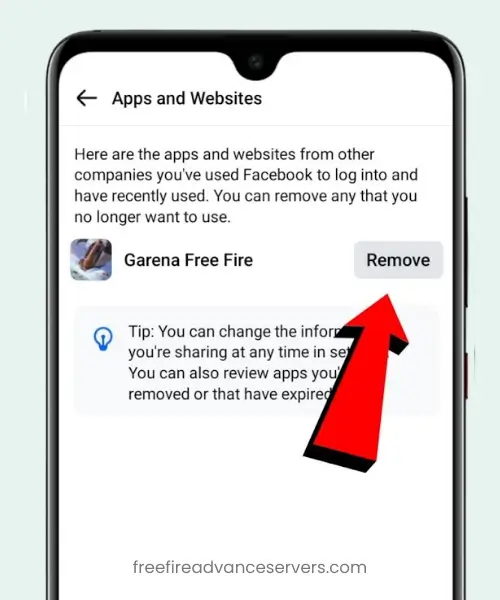
After removing Free Fire from Facebook, the game can no longer use Facebook to log in. Your account will not open with Facebook again. In some cases, game data may stay saved on Garena servers for a short time. For full account removal, you may still need to contact Garena support.
How to Delete a Free Fire Account Linked With Google
You can block access to your Free Fire account by removing it from your Google account.
Step by Step Method Using Google Account
- Open your Google account settings and sign in.
- Go to Security and open Third party apps with account access.
- Find Garena Free Fire in the list.
- Select it and tap Remove Access.
- Confirm to complete the action.
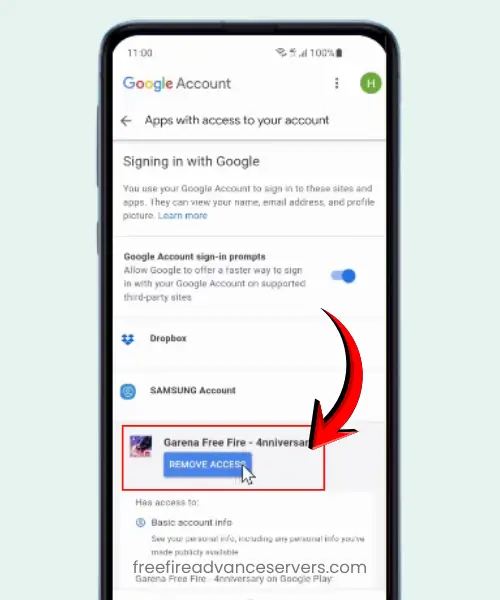
After removal, Free Fire will not open using Google login. Check that the game asks for a new login method when opened. If the account still opens, it may be linked to another login. For full account removal, contact Garena support.
How to Delete a Free Fire Account Linked With Apple ID
If your Free Fire account is linked to an Apple ID, you need to use Apple settings to remove it.
Step by Step Method Using Apple ID
- Open Settings on your iPhone or iPad.
- Tap your name at the top to open Apple ID settings.
- Go to Apps Using Apple ID or Password & Security > Apps Using Apple ID.
- Find Garena Free Fire in the list.
- Select it and choose Stop Using Apple ID to remove access.
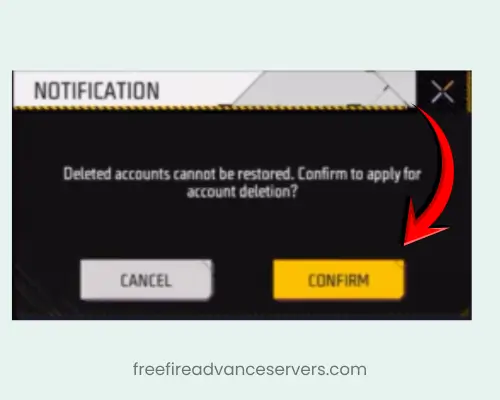
After this, Free Fire will no longer be able to log in with your Apple ID. Some account data may still be saved on Garena servers. For complete deletion of all items and progress, you may need to contact Garena support directly.
How to Delete a Guest Free Fire Account
Guest Free Fire accounts or FF advance server can be deleted, but they work differently from linked accounts.
Guest accounts are saved only on your device. They are not connected to Facebook, Google, VK, or Apple ID. This means the account cannot be removed through external settings.
If you uninstall or reinstall Free Fire, all guest account data is lost immediately. The game cannot recover this data because it is not stored on Garena servers. To keep progress, players should link their guest account to Facebook, Google, VK, or Apple ID before deleting or switching devices.
How to Request Account Deletion Through Garena Support
Sometimes, removing the login is not enough to fully delete your Free Fire account. In these cases, you need help from Garena support to complete the process.
When Support Help Is Required
Support is needed if your account is stuck, you cannot remove the linked login, or you face login errors after unlinking. They can guide you through account removal safely.
Information You Must Provide
When contacting Garena support, you should provide:
- Player ID – your unique Free Fire ID.
- Server – the server your account belongs to.
- Linked Platform – whether the account is connected to Facebook, Google, VK, Apple ID, or is a guest account.
Providing this information ensures support can locate your account and process the deletion correctly.
How Long Does Free Fire Account Deletion Take?
Free Fire account deletion usually takes a few hours to a few days. During this time, the request is processed, and the account becomes inaccessible. All progress, diamonds, skins, and stats are locked and cannot be recovered once deletion is complete.
Common Problems While Deleting a Free Fire Account
Sometimes, deleting a Free Fire account can run into small issues. Knowing these problems helps you fix them quickly.
Account Still Accessible After Unlinking
Even after unlinking from Facebook, Google, VK, or Apple ID, the account may still open. This happens because the game may keep temporary access or the unlinking process was not completed correctly. To fix this, check that the account is fully removed from the linked platform. If it still works, contact Garena support for full deletion.
Wrong Login Method Used
Using the wrong login method can prevent deletion. For example, trying to remove a Google-linked account while logged in with Facebook will not work. Always check which platform your Free Fire account is linked to before attempting deletion. This ensures the process works correctly.
Can You Recover a Deleted Free Fire Account?
No, you cannot recover a deleted Free Fire max account in most cases. Once an account is unlinked or removed, all progress, diamonds, skins, and stats are lost. Free Fire does not store deleted guest data, and linked accounts cannot be restored after unlinking.
Recovery is usually not possible because the account is treated as inactive, and the game has no way to reconnect your old data to a new login.
Safe Alternatives to Deleting Your Free Fire Account
If you are not ready to lose all your progress, there are safer ways to step back from Free Fire.
- Logging Out: Simply logging out of your account stops you from playing temporarily without deleting any data.
- Taking a Break: You can uninstall the game or set limits on playtime. Your account remains safe, and you can return anytime.
- Creating a New Account on a Different Login: You can start fresh by using a new login method like Facebook, Google, or VK. This keeps your old account intact while giving you a new start.
Conclusion
Deleting a Free Fire account is permanent and cannot be undone in most cases. You can remove your account by unlinking it from Facebook, Google, Apple ID, or VK, or by clearing guest account data. Once deleted, all progress, diamonds, skins, and stats are lost and cannot be recovered.
Before deleting, make sure you understand each step, save any important information, and double-check which login your account uses. If you are unsure, consider safer options like logging out, taking a break, or creating a new account with a different login. This way, you can step away from the game without losing your progress forever.
Frequently Asked Questions
Can I delete my Free Fire account with one click?
No. Free Fire does not allow one-click deletion. You must unlink your account from Facebook, Google, Apple ID, VK, or contact Garena support for full deletion.
Can I recover a deleted Free Fire account?
No. Once an account is fully deleted, all progress, diamonds, skins, and stats are lost. Recovery is generally not possible.
Are there safer alternatives to deleting my account?
Yes. You can log out, take a break, or create a new account on a different login without losing your old account.
How do I delete my Garena account?
You need to contact Garena support and provide your Player ID, server, and linked platform. Once deleted, all progress, items, and diamonds are permanently lost and cannot be recovered.
Can I have two ID.me accounts?
No, you cannot have two ID.me accounts with the same personal information. Each ID.me account must be unique and tied to one individual.
How long does Free Fire account deletion take?
It usually takes a few hours to a few days. During this time, your account becomes inaccessible while Garena processes the request.